How to Get TIN (Tax ID Number) Online in the Philippines

Need a TIN (Tax Identification Number) in the Philippines? Good news, you can now register online through the Bureau of Internal Revenue’s Online Registration and Update System (ORUS).

Employees, individual business owners, and those applying for a TIN under E.O. 98 or for certain one-time taxpayer transactions may have different registration requirements and procedures.

This guide will walk you through how to register a TIN online in the Philippines, the documents you may need, which BIR online service applies to your situation, and what you should know about the Digital TIN ID.

how to get tax ID number online Philippines

What is a TIN?

A Tax Identification Number (TIN) is the identification number assigned to a taxpayer by the BIR (Bureau of Internal Revenue) in the Philippines. It is used to identify taxpayers for tax-related transactions and other transactions where a TIN is required.

The BIR has made things a little easier with ORUS (Online Registration and Update System), giving taxpayers a way to handle certain registration and account updates online instead of automatically making a trip to a BIR office. Because, honestly, fewer government-office trips are something we can all celebrate.

But here’s one rule you really don’t want to learn the hard way: never apply for a second TIN just because you forgot your existing one. A TIN is meant to be unique to you. If you think you already have one but simply can’t remember the number, verify your information with the BIR first. Creating a duplicate TIN can lead to unnecessary complications—and nobody needs extra paperwork just for being forgetful.


Which Online TIN Registration Process Applies to You?

Use the following as a starting point:

Your situationAppropriate BIR route
Newly hired local employeeYour employer can process your TIN application through ORUS
You are registering an individual businessApply through ORUS as an individual new business registrant
You need a TIN under E.O. 98Apply through the applicable ORUS service
One-time taxpayer transactionUse the applicable E.O. 98/ONETT registration process
You already have a TIN and you forgot itDo not create another TIN; use verification or updating services

The BIR currently lists online TIN applications for local employees, E.O. 98/ONETT taxpayers, and individual new business registrants in its Citizen’s Charter.


How to Get TIN Online Using BIR ORUS

For TIN applicants and other taxpayers’ transactions, ORUS is the main BIR platform to start the online registration process. Here are the steps in getting a TIN online as an individual taxpayer.

Step 1: Create an ORUS Account

If you do not already have an ORUS account, go to the official ORUS website and sign up to create a new account. Otherwise, log in using your credentials.

BIR guidance states that taxpayers without an existing TIN or BIR record can create an ORUS account using a permanent email address. If you already have a TIN or BIR record, your email information may need to match the email registered with BIR.

Use an email address that you can access because BIR’s online systems use email for account-related communications and verification.

Step 2: Choose the Correct Registration Type

After accessing ORUS, select New Registration and choose the taxpayer type that applies to you.

BIR’s ORUS guidance specifically identifies Individual as one of the user types available during account creation.

Do not select a business registration option simply because you need a TIN for employment. Your reason for registration determines the appropriate process.

Accept the Terms and Conditions. Then Register as a “Taxpayer.” Select the “Without an Existing TIN” option.

Step 3: Select User Type Transaction

Choose among the following that applies to your transaction or purpose.

  • Get TIN for Foreign National – if you’re not a citizen of the Philippines
  • Register a Business as Professional – this is usually for doctors, Certified Public Accountants, engineers, dentists, lawyers, or any professional licensed by the PRC.
  • Register a Business as Single Proprietorship – if you’re an entrepreneur wanting to open your own business.
  • Register a Business as Professional and Single Proprietorship – if you are both a professional and business owner.
  • Get TIN for Filipino Citizen – E.O. 98 / One-Time Taxpayer – under E.O. 98 are usually students, newly hired, unemployed, or persons required to open a bank account, or citizens requiring a TIN for government-regulated services or transactions. One-time taxpayers are individuals who are filing for capital gains tax, estate tax, donor’s tax, and the like.
  • Get TIN for Overseas Filipino Worker (OFW)/ Overseas Contract Worker (OCW)

In this example, we’re registering a TIN under E.O. 98 or as a one-time taxpayer.

Step 4: Log in to Your ORUS Account

The BIR will send a verification message to your email. Click the “Verify Your Account” link. Once your ORUS account is successfully approved, log in as a taxpayer. From the dashboard, click “New Registration” again. Then select “Individual.”

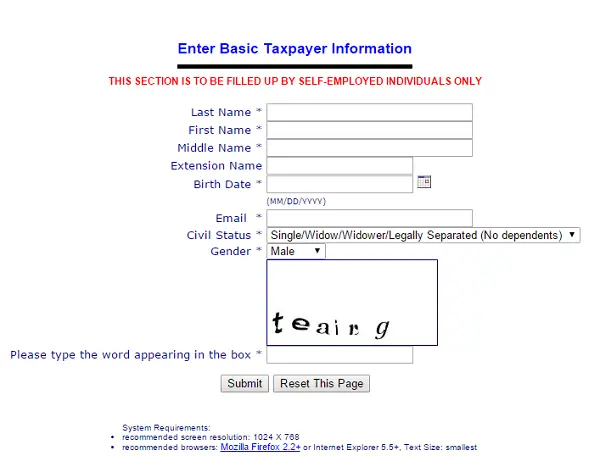
Step 5: Fill out Registration Form 1904

Fill out the required details for your profile. Some details are already stored when you registered your ORUS account. Provide your PhilSys Card Number if you have one already. Continue through the page until all the required information is completed. For married applicants, you also need to provide some info about your spouse.

Step 6: Upload Your Valid ID and a Selfie

For identification purposes, you need to upload any government-issued ID and a selfie holding your ID. The BIR accepts JPEG (.jpeg), PNG (.png), or PDF (.pdf) file formats. The maximum file size limit is 25MB.

Prepare clear and readable copies of any documents requested by ORUS. Avoid uploading blurry photographs, incomplete documents, or documents containing information that does not match your application.

Review your application details, then click the “Submit Application” button.

Step 7: Receive your TIN and Digital TIN ID

You will receive an email confirmation once you have submitted your application. Within three working days, the BIR will email the result of your TIN application. It will also contain your official TIN (Tax ID Number). Keep this and store a copy, as this will be your TIN for life.

After your TIN has been issued, eligible individual taxpayers can use BIR’s digital services to access a Digital TIN ID.

BIR introduced the Digital TIN ID through ORUS and states that it can serve as proof of TIN ownership, subject to authentication and verification. The Digital TIN ID includes a QR code that can be used for online verification.

There is also a newer option: in April 2026, BIR announced that the Digital TIN ID became available through the DICT eGovPH mobile application. BIR recognizes both the ORUS-generated Digital TIN ID and the Digital TIN ID accessed through the eGovPH App, subject to their respective verification procedures.


Requirements for Online TIN Registration

The exact requirements can vary depending on your taxpayer type, so there’s no one-size-fits-all checklist here. But as a general rule, have your personal information ready, along with the appropriate valid ID or supporting registration documents. A little preparation now can save you from the classic “Wait… I need what?” moment later.

Before starting, prepare:

  1. A working email address that you can access.
  2. Valid identification documents when required.
  3. Accurate personal information, including your legal name and birth information.
  4. Address information relevant to your registration.
  5. Employment information if your TIN is being processed for employment.
  6. Business registration information if you are registering a business.
  7. Supporting documents applicable to your taxpayer category.

The BIR is pretty clear about this: incomplete applications may not be processed. So before you apply for a TIN, take a moment to double-check the requirements for your specific type of registration. Because discovering you’re missing one document after you’ve already started the process? Not exactly the kind of plot twist anyone asked for.


How Much Does TIN Registration Cost?

Here’s some good news for your wallet: getting a TIN under E.O. 98 or registering as a one-time taxpayer generally comes with no registration fee. It costs nothing; in short, it’s free.

And if you’re registering a business, don’t automatically reach for that old ₱500 annual registration fee. That rule is officially a thing of the past.

Under the Ease of Paying Taxes Act, the BIR stopped collecting the ₱500 Annual Registration Fee effective January 22, 2024—and that applies to both new and existing business taxpayers.

So if you stumble across an older article telling you to prepare ₱500 for the annual registration fee, you can put your wallet away. That information is outdated.

That said, other taxes, fees, or documentary requirements may still apply depending on your specific registration or transaction. When it comes to taxes, it’s always better to check the latest BIR requirements for your taxpayer type before you proceed.


How Employees Get a TIN Online

Starting a new job? Your TIN journey looks a little different from someone registering a business.

According to the BIR’s current process, newly hired local employees have their TIN application handled through their employer via ORUS. The employer uses its ORUS account and the Employer Service Link to facilitate the employee’s TIN issuance.

So, if your new employer tells you that you need a TIN, don’t immediately start filling out a separate application on your own. Check with your HR department or the company’s authorized representative first and ask how they’re handling the registration.

Think of it as one less government form for you to wrestle with. And, most importantly, don’t create another TIN under a different registration category just because you’re starting a new job. One taxpayer, one TIN—that’s the goal.


How to Get a TIN for Business or Self-Employment

Thinking about starting a business, going freelance, or earning income as a self-employed individual? Your TIN registration takes a slightly different route from that of an employee.

The BIR’s current Citizen’s Charter includes “Application for TIN and Registration of Individual New Business Registrants” as an online service through ORUS.

Before you jump in, make sure you have the registration details and supporting documents required for your specific type of business. Prepare your DTI business name registration and Mayor’s Permit.

And if your business lives online, don’t assume that being behind a screen means you’re off the BIR’s radar. Online sellers may also be subject to BIR registration requirements. BIR guidance says taxpayers engaged in business should register their applicable business or trade names and declare store names used on online pages, websites, or e-commerce platforms, when required.

Basically, whether your “store” has a physical sign or just a profile picture and a Buy Now button, make sure you understand the registration rules that apply to your business.


Common TIN Registration Problems

What if I already have a TIN?

Do not apply for another TIN just because you cannot remember your number. The correct approach is to use the BIR’s available TIN inquiry or verification services.

BIR has incorporated TIN inquiry and verification functionality into its online services.

What if my email is already registered?

If you already have a BIR record, the email associated with that record may be required for ORUS enrollment. BIR guidance says taxpayers with an existing TIN or BIR record should use an updated permanent email address existing in BIR registration.

Can I use the Digital TIN ID instead of a physical TIN card?

The BIR states that the Digital TIN ID is a valid government-issued identification document, subject to authentication and verification. It also states that taxpayers with a Digital TIN ID are not required to obtain a physical TIN card.

What if ORUS does not work?

First, make sure you are using the official ORUS website and that your account information is correct.

If you cannot access the email associated with your ORUS account, BIR provides an ORUS function for requesting a new OTP link.

For problems that cannot be resolved online, consult BIR’s official contact channels or the Revenue District Office handling your registration.

FAQ About TIN Application in the Philippines

1. Can I get a TIN online in the Philippines?

Yes, follow the 7 steps above if you’re a new taxpayer without an existing Tax ID NUmber. BIR provides several online TIN registration services through ORUS. The applicable service depends on whether you are an employee, individual new business registrant, or an E.O. 98/ONETT taxpayer.

2. What website do I use to register a TIN online?

Use the official BIR Online Registration and Update System (ORUS). The official ORUS address is orus.bir.gov.ph.

3. Can an employee apply for a TIN online by themselves?

For already-hired local employees, BIR’s current requirements state that the employer processes the TIN application through ORUS using the Employer Service Link.

4. Can freelancers get a TIN online?

A freelancer who needs to register as an individual business taxpayer may use the BIR’s online registration process for individual new business registrants, subject to the applicable requirements.

5. Is a TIN registration fee still ₱500?

The BIR stopped collecting the ₱500 Annual Registration Fee effective January 22, 2024. Older articles that say every new business applicant must pay this annual fee are outdated. Getting a fee online for one-time taxpayers or under EO 98 is free,

6. Can I have more than one TIN?

You should not create a second TIN if you already have one because it’s illegal and punishable by law. If you are unsure whether you have a TIN, use BIR’s verification or inquiry services instead of submitting a duplicate application.

7. Can I get a Digital TIN ID online?

Yes. Individual taxpayers can access a Digital TIN ID through BIR’s digital services. BIR also announced in April 2026 that the Digital TIN ID is available through the DICT’s eGovPH mobile application.

8. Do I need a physical TIN card if I have a Digital TIN ID?

BIR states that taxpayers with a Digital TIN ID are not required to secure a physical TIN card. The Digital TIN ID can be presented as proof of TIN ownership, subject to authentication and verification.


More tax guides:

How to Compute Income Tax in the Philippines

List of BIR RDO Codes

How to Register a Business in the BIR

Subscribe for free!

Fehl is the founder of Philpad and has been writing online for 14 years. She has a bachelor's degree in Accountancy and a background in Finance. She is a licensed Career Service Professional and author of a poetry book at Barnes & Noble. In her spare time, she likes to travel and discover new places.

error: Content is protected !!